What to Do If Stud Finder Detect Live Wire: Complete Safety Guide
If you are wondering what to do if stud finder detect live wire, stop drilling or fastening in that area, mark the warning zone, scan it again from several directions, and assume electrical wiring may be present until you can establish otherwise. Do not treat the stud finder as an exact wire locator, and do not assume the area becomes safe to drill simply because you switch off a breaker.
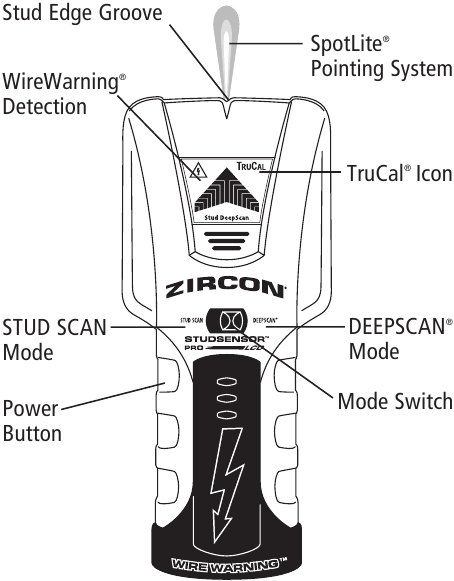
Many modern stud finders include live-AC detection as an additional warning feature. Depending on the model, the tool may display a lightning-bolt symbol, illuminate a warning light, sound an alarm, or indicate AC voltage while you are scanning for a stud. The warning deserves attention because electrical cable can pass beside a stud or directly through holes bored in it.
At the same time, an AC warning does not necessarily tell you the precise location, depth, or path of a wire. Electronic detection can be affected by wall materials, moisture, static electricity, shielding, metal, and other conditions. Manufacturers also warn that live-wire detection has limitations and that failure to receive a warning does not prove a wall is free of electrical wiring.
The safest approach is therefore to treat the live-wire indication as a warning rather than a drilling target. In this guide, I’ll explain what the warning means, what to do immediately, how to check whether the reading is repeatable, why false positives happen, why false negatives are also possible, what happens if the warning appears over a stud, and when you should relocate your fastener or call an electrician.
What to Do If Stud Finder Detect Live Wire Right Away

When your stud finder indicates live AC electricity, do not drill, drive a screw, hammer a nail, or cut into that location yet.
The first step is simply to stop and mark the area where the warning appeared.
Move the stud finder away from the location, recalibrate it according to its instructions if required, and scan the same section of wall again. Approach the suspected area from both left and right. It can also help to scan at different heights to determine whether the indication follows a recognizable route.
If the alert appears repeatedly in approximately the same area, treat it as a possible electrical cable location.
Do not keep drilling because you believe the screw will probably miss the wire.
Mark a Warning Zone, Not Just One Point
A stud finder does not normally show you the exact outer edges of a concealed electrical cable with engineering-level precision.
If the live-wire symbol appears over a certain section of wall, mark a reasonable area around the indication rather than drawing a tiny dot and assuming everything beside it is safe.
This is especially important when the tool’s AC alert appears across a relatively wide section.
Your objective is not to determine the cable’s position to the nearest fraction of an inch with a basic stud finder. Your immediate objective is to identify an area where penetrating the wall deserves additional caution.
Scan the Area More Than Once
One pass is not enough for an important drilling decision.
Move the detector across the wall slowly and consistently. Repeat the scan from the opposite direction and at nearby heights.
Some professional wall scanners specifically instruct users to make repeated passes to better localize a live conductor.
If several scans produce a warning in approximately the same location, take that result seriously.
If the warning appears randomly in widely different locations, you may be dealing with interference, poor calibration, wall conditions, or another limitation of the detector. That still does not give you permission to drill blindly.
Look for Nearby Electrical Devices
Consider what is located around the warning.
A receptacle, wall switch, light fixture, thermostat, junction box, or other electrical device can provide an obvious reason for wiring to be nearby.
Wiring routes are not always predictable, however. Do not assume cable must travel perfectly vertically or horizontally from a visible outlet.
Remodeling, unusual framing, multiple circuits, and different construction methods can all change the route.
Key Takeaways:
- Stop before drilling whenever the live-wire warning appears.
- Repeat the scan from different directions and mark the broader warning area.
- Treat the alert as evidence of possible wiring, not as an exact map of the cable.
What Does the Live Wire Warning on a Stud Finder Mean?
A live-wire alert means the stud finder believes it is sensing an electrical field associated with energized AC wiring.
How the feature works varies by manufacturer and model.
Some tools continuously monitor for live AC while you are using ordinary stud-scanning modes. Others provide a separate AC-scanning mode intended to narrow down a suspected energized conductor.
For example, some Zircon stud finders include a WireWarning feature that operates while searching for studs, while certain multi-function scanners also provide a dedicated AC mode.
This feature is valuable, but it should be considered supplemental protection.
It is not the same as opening the wall and visually identifying the cable, nor is it equivalent to a professional cable-tracing system.
Can a Stud Finder Really Detect Electrical Wires?
Many electronic models can detect the electric field produced by energized AC wiring under suitable conditions.
However, the detection capability depends on factors such as wall construction, cable depth, whether the wire is energized, shielding, surrounding materials, and the design of the detector.
That means two important things can be true simultaneously:
A stud finder can correctly warn you that a live conductor may be nearby.
A stud finder can also fail to detect a conductor that is actually present.
That second point is why you should never use the absence of a live-wire icon as proof that drilling is safe.
Live Wire Detection Is Different From Stud Detection
Stud detection and electrical detection use different characteristics.
A stud finder may identify a wood stud based on density changes while separately sensing an electric field from AC wiring.
Therefore, it is completely possible for the detector to indicate both a stud and live electrical wiring in the same general location.
That does not necessarily mean the tool is malfunctioning.
Electrical cables often need to cross framing members and may pass through holes in wood studs.
What If the Stud Finder Detects a Live Wire Exactly Where the Stud Is?
This situation is common enough to be confusing.
You scan the wall, identify the center or edge of a stud, but the live-wire warning appears in approximately the same place.
Do not assume that because you found solid wood, drilling there must be safe.
A cable can pass horizontally through a hole bored through the stud.
The warning could therefore represent a cable crossing the stud at that particular height.
Scan Above and Below the Location
One useful next step is to move vertically along the stud.
Suppose the live-wire warning appears around 48 inches above the floor.
Scan the same stud several inches higher and lower.
If the stud indication continues vertically but the electrical warning appears only across one narrow height range, a cable may be crossing through or near the stud around that level.
That is not proof of the exact cable route, but it is a strong reason to choose another mounting point if possible.
If the warning continues vertically toward a receptacle or switch, the wiring may instead be running generally along that section of wall.
Do Not Drill Through a Metal Plate
While looking for a mounting location, you may encounter resistance from metal immediately behind the drywall or stud face.
Stop.
Protective metal plates are commonly installed where pipes or electrical cables pass close enough to framing surfaces that screws or nails could damage them.
A metal plate is not an obstacle that should be defeated with a stronger drill bit.
If you encounter one, choose another fastening location or determine what is behind it before proceeding.
Can a Stud Finder Give a False Live Wire Reading?
Yes. Live-AC detection can produce warnings that do not correspond neatly to the precise position of a cable.
The electric field around energized wiring can extend beyond the cable itself, so the warning area can be wider than the wire.
The detector can also be influenced by the surrounding construction and environment.
Static Electricity Can Affect Detection
Static electricity can interfere with some electronic wall scanners.
Depending on the detector, the wall surface, clothing, flooring, and environmental conditions can contribute to unusual readings.
Follow the calibration and handling instructions for your specific stud finder if the warnings seem unusually broad or inconsistent.
Do not apply random internet tricks without checking the manufacturer’s instructions because different detection technologies behave differently.
Moisture Can Cause Problems
Damp walls and high moisture content can interfere with certain electronic detection methods.
A wall near a bathroom, plumbing leak, basement moisture problem, or recently applied wet finish may therefore produce confusing results.
Moisture itself can also indicate a separate building problem that deserves investigation.
Foil and Conductive Materials Can Interfere
Foil-faced insulation, metal lath, conductive wall coverings, metal-backed materials, and similar construction can make electrical scanning considerably more difficult.
Bosch specifically warns that conductive or metalized surfaces and moisture can interfere with reliable live-conductor detection.
In a wall with these materials, an advanced scanner or professional investigation may be necessary.
Nearby Electronics Can Affect a Scanner
Strong electromagnetic fields from nearby equipment can sometimes interfere with sensitive detection tools.
If the manufacturer’s instructions recommend moving or switching off nearby equipment during scanning, follow that procedure and repeat the test.
The key is consistency.
A repeatable warning at the same physical location deserves more attention than a warning that jumps randomly across the wall, but neither situation should be resolved by blindly drilling.
Can a Stud Finder Fail to Detect a Live Wire?
Yes, and this limitation is at least as important as false alarms.
Manufacturers warn that live-wire sensors may fail to detect wiring under certain conditions, including cables that are too deep, shielded, routed through conduit, positioned behind certain construction materials, or affected by wall moisture.
A de-energized wire will also not produce the same live-AC signal.
Therefore:
No warning does not mean no wire.
This is one of the most important rules when using a stud finder before drilling.
Turning Off the Breaker Creates Another Detection Limitation
Suppose your stud finder warns of electricity, so you switch off the breaker.
If you scan again and the AC warning disappears, that can support the idea that the original signal was associated with that energized circuit.
But it does not mean the wire disappeared.
The cable is still physically inside the wall.
Once it is de-energized, the stud finder’s live-AC feature may simply be unable to detect it.
Do not use the disappearance of the warning as permission to drill through the same location.
Should I Turn Off the Breaker Before Drilling Into a Wall?
If you are going to penetrate a wall where electrical wiring may be present, shutting off the relevant electrical power is an important safety precaution.
Major wall-scanner manufacturers instruct users to shut off electrical power and other relevant utilities before penetrating surfaces when concealed services may be present.
However, turning off a breaker should be considered additional protection, not a method of clearing the drilling location.
You still want to avoid hitting the cable.
A drill bit or screw can damage insulation, sever conductors, create a future fault, or damage wiring even when that wiring is currently de-energized.
Make Sure You Identified the Correct Circuit
A wall may contain wiring from more than one branch circuit.
Turning off the breaker controlling the nearest receptacle does not guarantee that every cable inside that wall cavity has been de-energized.
This is particularly important near kitchens, utility rooms, multi-wire installations, remodeled spaces, and walls shared by different rooms.
If you cannot confidently determine what is inside the wall and your mounting location cannot be moved, an electrician is the safer option.
Key Takeaways:
- Stud finders can produce both false-positive and false-negative AC readings.
- Turning off a breaker does not make it acceptable to drill through a suspected cable location.
- The disappearance of an AC alert after power is switched off does not prove the wall is clear.
How to Confirm a Suspected Live Wire More Safely
A basic stud finder gives you a useful first warning. When the exact location matters, use additional information rather than depending entirely on one sensor.
Check the Wall Layout
Look at both sides of the wall if accessible.
A switch or outlet on the opposite side may explain a warning that otherwise seems mysterious.
Also consider what is above and below the wall. Electrical wiring may continue toward another floor, attic, basement, crawlspace, or service area.
Use the Stud Finder’s Dedicated AC Mode
If your detector provides a separate live-wire or AC-scan mode, follow the manufacturer’s instructions for that mode.
Do not assume ordinary stud mode provides the most precise electrical reading.
Some dedicated modes allow repeated calibration to narrow down the region where the electrical field is strongest.
Consider a More Advanced Wall Scanner
A multi-material scanner may help distinguish among:
- Wood framing
- Ferrous metal
- Nonferrous metal
- Live conductors
- Other concealed objects
Even an advanced scanner has limitations, though.
The purpose is to build more evidence about what is inside the wall, not to make drilling risk-free.
Use Building Plans When Available
Construction drawings, remodeling photos, electrical plans, and photographs taken before drywall installation can be extremely useful.
If you are working in your own home, keeping photographs of open walls during future renovations is a simple way to make later mounting work much easier.
What If the Live Wire Warning Appears Across a Large Part of the Wall?
An unusually wide AC warning can happen for several reasons.
The wiring may actually follow that area, but interference can also make the detection zone appear much larger than the cable itself.
First, make sure you are using the detector exactly as specified. Some stud finders depend heavily on correct calibration and hand placement.
Try scanning from several starting points and at different heights.
If the warning remains broad and you cannot confidently distinguish framing from electrical wiring, do not use the detector to pick a drilling point within that area.
A more capable wall scanner or professional inspection is the better solution.
What If the Stud Finder Shows Live Wire Near an Outlet?
This should not be surprising.
Electrical wiring must reach the receptacle box somehow, so wiring in the surrounding area is expected.
What you should not do is assume you know the exact cable route simply from the outlet position.
Cable may approach the box from above, below, left, or right depending on the framing and circuit layout.
Other cables may also pass through the same stud bay without connecting to that particular outlet.
When mounting shelves, televisions, cabinets, or other hardware near electrical devices, give yourself as much flexibility as possible rather than trying to place a long screw immediately beside the box.
What If You Need to Drill Exactly Where the Warning Appears?
Sometimes moving the mounting point is easy. Other times a bracket, cabinet, handrail, or structural attachment has to go within a limited area.
If the live-wire warning repeatedly appears where a required fastener needs to go, do not resolve the uncertainty by drilling slowly and hoping for the best.
At this point, you need better information about the wall.
That may mean using professional scanning equipment, accessing the wall from another side, inspecting construction plans, or having an electrician determine the cable route.
Opening a small controlled section of drywall and repairing it afterward may even be preferable to blindly drilling into a location that repeatedly registers as electrical.
For a high-consequence installation, certainty is more important than avoiding a minor drywall repair.
Can You Safely Drill Near a Detected Electrical Wire?
There is no universal distance I would recommend based solely on a consumer stud finder’s display.
You usually do not know the exact depth, cable direction, sensor accuracy, or width of the detector’s warning zone.
A stud finder might indicate the strongest electrical field near one point even though the cable itself is positioned somewhat differently.
If your project allows you to relocate the screw substantially, that is my preferred option.
If it does not, determine the actual wall layout before drilling.
Fastener Length Matters Too
Longer screws penetrate farther into the wall cavity.
Use fasteners appropriate for the load and wall construction rather than automatically choosing the longest screw available.
For heavy objects, the goal is sufficient structural engagement—not maximum possible penetration.
If an installation requires unusually long anchors, lag screws, or drilling into masonry behind a finished wall, concealed utilities become even more important to identify accurately.
What to Do If You Already Drilled Where the Stud Finder Showed a Live Wire
Stop immediately if you believe you may have contacted electrical wiring.
Do not reach into the hole with a metal object.
If you experienced a spark, breaker trip, burning smell, loss of power, unusual electrical behavior, or visible conductor damage, leave the circuit off and have the wiring inspected.
Even if the circuit still seems to work, a screw or drill bit can damage cable insulation without completely severing the conductor.
That hidden damage can create a future electrical hazard.
If a fastener may have penetrated a cable, removing the screw and pretending nothing happened is not an adequate repair.
The cable needs to be evaluated and repaired using an appropriate electrical method.
Common Mistakes to Avoid When a Stud Finder Detects Electricity
One of the most common mistakes is treating the live-wire feature as either perfectly accurate or completely useless.
Neither approach is correct.
The warning is useful information, but it operates within technological limits.
Another mistake is turning off the breaker, rescanning, seeing the warning disappear, and then drilling directly through that point. The wire may simply be de-energized and therefore no longer detectable by the AC sensor.
It is also risky to assume that finding the center of a wood stud guarantees safety. Wiring frequently passes through framing.
Finally, never drill through an unexpected metal barrier in a stud simply to reach the wood behind it. That metal may have been intentionally installed to protect a cable or pipe.
A Practical Decision Guide
| What the Stud Finder Does | What I Recommend |
| One brief AC warning that does not repeat | Recalibrate and rescan before drilling |
| Repeated warning in the same area | Treat the area as containing possible live wiring |
| Stud and AC warning appear together | Assume wiring may pass through or beside the stud |
| Warning disappears after breaker is off | Do not assume the wire is gone; avoid the location |
| Warning appears near an outlet or switch | Expect wiring and investigate its likely route |
| AC indication covers a very wide area | Check for interference and use a better scanning method |
| Drill encounters a metal plate | Stop; do not drill through it |
| Required fastener must go through warning area | Identify the concealed wiring more accurately first |
| You may already have hit a wire | De-energize the circuit and have the damage evaluated |
The safest principle is simple: uncertainty is a reason to stop penetrating the wall, not a reason to guess.
Key Takeaways:
- A live-wire alert should change your drilling plan until the area is better understood.
- Never drill through protective metal simply because it blocks your intended fastener.
- For heavy or fixed-position installations, professional cable location can be safer than relying on a consumer stud finder.
FAQs about what to do if stud finder detect live wire
Why does my stud finder say there is a live wire?
The detector is sensing what it interprets as an electrical field from energized AC wiring.
The alert may correspond to actual wiring, but the indicated area is not necessarily the exact cable position. Environmental and construction conditions can also affect detection.
Should I drill where my stud finder detects AC?
No. Do not drill into that location until you have investigated further.
Rescan the wall, examine nearby electrical devices, use additional detection methods, or relocate the mounting point.
Can a live wire run through a stud?
Yes.
Electrical cable is commonly routed through holes in framing members, so detecting both a stud and electrical activity in the same location is entirely possible.
Should I turn off power before drilling into a stud?
If concealed wiring may be present, shutting off the relevant electrical supply is a sensible safety measure.
However, the goal should still be to avoid the cable itself. Turning off electricity does not prevent your screw or drill bit from physically damaging the wiring.
Why does the live-wire warning disappear when I turn off the breaker?
The detector’s AC function usually relies on sensing an electrical field created by energized wiring.
When the circuit is switched off, that field may disappear even though the cable remains physically inside the wall.
Can a stud finder detect a wire when the breaker is off?
The live-AC function may not detect a de-energized cable.
A scanner with suitable metal or other detection capabilities may still detect some components, but results depend on the cable, construction, depth, and detector technology.
Can a stud finder mistake metal for a live wire?
Multi-sensor tools distinguish objects using different detection methods, but wall conditions and interference can produce confusing readings.
Repeat the scan and use the correct mode for your detector instead of assuming every warning represents a precisely located cable.
Why does my stud finder detect electricity everywhere?
Possible reasons include electrical interference, conductive wall materials, static electricity, moisture, calibration problems, or actual wiring distribution.
Check the user manual, recalibrate correctly, and scan from different areas. If the warning remains widespread, do not rely on the tool alone for a drilling decision.
Can moisture make a stud finder show live wires?
Moisture can interfere with some electronic wall scanners and make electrical detection less reliable.
If the wall is damp, consider both the scanning limitation and the reason moisture is present.
How accurate is AC detection on a stud finder?
It can be a valuable warning feature, but it is not accurate enough to guarantee the exact position of every concealed conductor.
Depth, shielding, wall materials, electrical load, moisture, and detector design can affect performance.
Can a stud finder detect wires inside conduit?
Live-wire detection can be limited when wiring is enclosed in metal conduit or shielded by conductive materials.
Do not assume a negative scan proves that conduit or wiring is absent.
How do I know which direction the wire runs?
Scan at several heights and from different directions and compare the warning pattern with nearby switches, receptacles, and electrical fixtures.
This may suggest a likely route, but if you need the exact path before drilling, use more appropriate cable-location equipment or professional help.
Is it safe to drill above an electrical outlet?
Not automatically.
Wires can leave an outlet box in several directions. Never assume that directly above, below, or beside an outlet is guaranteed clear.
Scan first and avoid the area if the result is uncertain.
Is it safe to screw into the center of a stud if electrical wire is present?
Not automatically.
Although the center of a stud can provide strong structural attachment, electrical cable may pass through that stud at certain heights.
If the stud finder shows a repeatable live-wire warning at your planned screw location, choose another point or investigate before drilling.
What does it mean if I hit metal while drilling into a stud?
Stop drilling.
You may have reached a protective metal plate installed over electrical wiring or plumbing. Do not drill through an unknown metal plate simply to continue the hole.
What should I do if a screw may have hit an electrical wire?
Stop using the affected circuit and have the wiring inspected.
A cable can suffer insulation or conductor damage even when the breaker did not trip and the connected devices still appear to work.
Is a non-contact voltage tester enough to prove a wall is safe?
No single consumer detector should be treated as proof that a concealed wall area is completely free of wiring.
Non-contact voltage testers and stud-finder AC sensors have limitations. Use them as part of a broader safety process rather than as permission to drill anywhere they remain silent.
Should I call an electrician if my stud finder detects a live wire?
Not necessarily for every warning.
If you can simply relocate a picture hook or shelf fastener well away from the warning, that may solve the problem.
An electrician becomes the better choice when the required hole cannot be moved, the readings are confusing, the wall contains multiple electrical devices, or you suspect wiring has already been damaged.
Conclusion
If you are searching for what to do if stud finder detect live wire, the safest response is straightforward: stop before penetrating the wall and treat the indicated area as though electrical wiring may actually be present.
Mark the warning area, scan it repeatedly from different directions and heights, and consider nearby outlets, switches, and other electrical equipment. If the tool repeatedly gives the same AC warning, I would choose another drilling position whenever the project allows it.
Remember that stud-finder live-wire detection is a warning system, not a perfect map of concealed wiring. False positives can occur because of wall materials, static, moisture, or interference, while false negatives are also possible when wires are deep, shielded, de-energized, or hidden behind materials that interfere with detection.
Turning off the breaker is an important safety precaution when working around suspected wiring, but it does not make the cable disappear. A de-energized wire can still be damaged by a screw, nail, or drill bit, and the stud finder may stop detecting it once electrical power is removed.
Also, do not assume that the center of a stud is automatically safe. Electrical cables frequently pass through framing. If a live-wire warning appears at the exact height where you intend to install a fastener, move the attachment point or identify the wiring more accurately first.
For a small picture or lightweight shelf, relocating the fastener is usually easy. For a TV mount, cabinet, handrail, or another installation where the mounting position is limited, I recommend resolving the wire location before drilling. And if you encounter a protective metal plate or suspect you have already contacted a cable, stop rather than drilling farther.
The practical rule is simple: a stud finder warning is a reason to investigate, not a signal to guess where the wire might be. Avoiding one questionable drilling location is far easier than repairing damaged concealed electrical wiring later.