What Is Deep Scan on Stud Finder? How and When to Use It
If you are wondering what is deep scan on stud finder, Deep Scan is a scanning mode designed to locate studs or framing that are deeper behind the wall surface than a standard stud-finding mode can reliably detect. It is most useful on thicker walls, double-layer drywall, paneling over drywall, and other surfaces where the normal scan mode cannot get a clear reading.
Deep Scan does not necessarily make a stud finder more accurate on every wall. In fact, using it unnecessarily can sometimes make readings harder to interpret because the tool is looking farther into the wall cavity, where it may respond to additional materials or objects.
On several current Zircon stud finders, for example, normal StudScan is specified for locating framing up to about 3/4 inch deep, while DeepScan extends that range to about 1 1/2 inches. The exact depth depends on the stud finder you own, so the manufacturer’s manual should always take priority.
For most standard drywall walls, I recommend starting with normal stud mode rather than immediately selecting Deep Scan. If the regular mode gives weak, inconsistent, or no readings and you know the wall covering is relatively thick, switch to Deep Scan and scan again.
In this guide, I’ll explain what Deep Scan means on a stud finder, how it differs from normal stud mode, when you should use it, when you should avoid it, why Deep Scan may produce confusing readings, and how to use it safely before drilling into a wall.
What Is Deep Scan on Stud Finder and What Does It Detect?

Deep Scan is essentially a greater-depth stud-detection mode.
An electronic stud finder works by sensing changes in the material behind the wall surface. A normal wall may have drywall in front, an empty cavity behind much of the drywall, and wood or metal framing at regular intervals.
As the scanner moves across the wall, it senses a difference when the material behind the scanning surface changes.
The challenge is that the sensor’s ability to identify that difference decreases as more material is placed between the tool and the framing.
One layer of ordinary drywall is relatively easy for many stud finders to scan.
Add another layer of drywall, thick wall covering, wood paneling, or another compatible surface layer, and the framing becomes harder for the scanner to distinguish.
Deep Scan increases the effective scanning depth so the device can search farther below the surface.
For example, Zircon currently describes DeepScan on multiple models as approximately doubling the stud-scanning depth from 3/4 inch to 1 1/2 inches.
That does not mean every tool labeled “Deep Scan” has exactly the same depth. Different brands and models use different sensing systems and specifications.
Deep Scan Does Not Literally See Through the Wall
It is useful to understand what the tool is actually doing.
A typical electronic stud finder is not producing a photographic image of the inside of your wall.
It is interpreting changes detected by its sensors and using those changes to indicate where framing may be located.
That is why a scanner can occasionally respond to something other than a wooden stud.
Depending on the tool and wall construction, unusual readings can sometimes be associated with metal framing, pipes, electrical components, additional wall layers, blocking, or other material changes.
Deep Scan simply allows the tool to evaluate a deeper region.
Key Takeaways:
- Deep Scan is intended for locating framing deeper behind a wall surface than normal stud mode can reach.
- It should generally be used when wall thickness makes a regular scan unreliable, not automatically for every wall.
Normal Stud Scan vs. Deep Scan
Normal scan and Deep Scan have the same basic goal: locating framing behind a finished surface.
The major difference is how deeply the stud finder is intended to scan.
For a typical single layer of drywall, normal stud mode is usually the better starting point.
For a thicker wall system, Deep Scan may provide the additional sensing range necessary to reach the framing.
| Feature | Normal Stud Scan | Deep Scan |
| Best for | Typical drywall walls | Thicker wall surfaces |
| Scanning depth | Shallower | Deeper |
| First mode to try | Usually yes | Usually no |
| Double drywall | May struggle | Often more appropriate |
| Paneling over drywall | May struggle | Can be useful |
| Chance of detecting deeper objects | Lower | Potentially higher |
| Best practice | Use on ordinary walls | Use when standard mode is insufficient |
The exact numbers vary by product. On several Zircon models, standard StudScan is rated to approximately 3/4 inch and DeepScan to approximately 1 1/2 inches.
Why Not Use Deep Scan All the Time?
It is easy to assume that deeper must be better.
That is not necessarily true.
If the stud is immediately behind ordinary drywall, you do not need the scanner to search farther into the wall cavity.
A deeper scan can expose the sensor to more hidden material. That can make it harder to determine whether the reading is coming from the framing you want or from another object farther behind the surface.
One manufacturer specifically recommends avoiding unnecessary scanning depth because plumbing and electrical components can be located deeper within the wall cavity than the stud surface immediately behind the drywall.
For this reason, I recommend treating Deep Scan as a problem-solving mode rather than a default setting.
Start shallow. Go deeper only when necessary.
When Should You Use Deep Scan on a Stud Finder?
Deep Scan becomes useful when there is more material than usual between the scanner and the framing.
Several common situations fall into this category.
Double-Layer Drywall
Two layers of drywall can be found in walls built for improved fire resistance, sound control, remodeling, or other construction requirements.
If the combined surface thickness exceeds what your stud finder’s standard mode can reliably penetrate, the normal mode may provide no reading or inconsistent readings.
Deep Scan is specifically useful in this situation.
For models with approximately 1 1/2 inches of deep-scanning capability, two typical layers of drywall may still fall within the intended detection range.
Paneling Installed Over Drywall
Older homes and remodeled rooms sometimes have decorative wood or composite paneling installed over drywall.
Your stud finder now has to sense through both materials before it reaches the stud.
Normal mode may still work if the paneling is thin, but Deep Scan can be useful if readings are weak or inconsistent.
Thick Wall Coverings
Certain decorative wall finishes can increase the distance between the scanner and framing.
This does not automatically mean Deep Scan will work through every material.
The wall surface still has to be compatible with the scanner.
However, when thickness rather than material composition is the main problem, deeper scanning can help.
Older or Remodeled Walls
Renovations can leave multiple layers on a wall.
For example, a newer drywall layer may have been installed over an older finished surface.
From the room, the wall may look like ordinary drywall, but the framing can be much farther from the visible surface than expected.
If standard scan repeatedly fails, Deep Scan is worth trying.
Ceilings With Additional Surface Thickness
Some stud finders are also designed for locating joists behind ceilings.
If the ceiling has thicker compatible material between the scanner and framing, Deep Scan may help find the joists.
Remember that ceilings can contain electrical wiring, plumbing, ductwork, insulation, resilient channels, and other construction elements, so a positive scan should still be interpreted carefully.
When Should You Not Use Deep Scan?
I would not start with Deep Scan on an ordinary single-layer drywall wall unless the manufacturer’s instructions specifically tell you to do so.
Normal mode is usually sufficient.
If regular scan gives clear, repeatable stud edges or a consistent stud center, switching to Deep Scan provides little benefit.
Do Not Use Deep Scan Just Because You Want More Accuracy
Scanning depth and accuracy are not the same thing.
Deep Scan does not mean “precision mode.”
Its purpose is to reach deeper targets.
If the target is already shallow, additional scanning depth does not necessarily improve the result.
Do Not Assume Deep Scan Identifies Every Hidden Object
A Deep Scan stud mode is still primarily designed for its specified stud-finding function.
It is not automatically a complete utility-locating system.
A tool may have separate modes for detecting metal or live AC wiring. For example, some multifunction wall scanners provide separate StudScan, DeepScan, Metal Scan, and AC Scan functions because these are different detection tasks.
If you need to locate metal pipes or investigate electrical wiring, use the appropriate feature or a dedicated detector rather than assuming Deep Scan gives you that information.
Do Not Keep Scanning Deeper to Justify a Reading
Sometimes users expect a stud in a certain location and repeatedly switch modes until something beeps.
That is not a reliable locating method.
A reading should be repeatable and make sense in relation to the wall construction.
If Deep Scan identifies something that standard mode does not, scan from both directions and at several heights before assuming the target is a stud.
Key Takeaways:
- Use Deep Scan for thicker compatible walls, double drywall, paneling over drywall, or other situations where framing is farther from the surface.
- Deep Scan is not automatically more accurate and should not be confused with dedicated metal or electrical scanning modes.
How Deep Can a Stud Finder Scan?
There is no single scanning depth for every stud finder.
The maximum depth depends on the specific tool, scanning technology, target material, and wall construction.
Some common consumer stud finders detect framing through approximately 3/4 inch of compatible wall material in standard mode.
Models equipped with deeper detection may extend to approximately 1 1/2 inches.
For example, Zircon’s current StudSensor e50, A100, HD55, and several MultiScanner models specify about 3/4 inch in normal StudScan and up to 1 1/2 inches in DeepScan.
Do not assume those specifications apply to another manufacturer’s tool.
Check the manual for your exact model.
Scan Depth Is Not the Same as Wall Thickness
Suppose the wall covering is 1 inch thick.
A stud finder rated for 1 1/2-inch scanning depth may potentially detect framing behind it.
But real-world detection can still be affected by the material itself.
Thickness is only one factor.
Dense materials, foil-backed products, metal mesh, certain tile installations, plaster systems, moisture, or unusual construction can interfere with electronic sensing.
A depth specification tells you how far the unit is designed to detect under appropriate conditions; it does not guarantee that every 1 1/2-inch-thick wall can be scanned successfully.
How to Use Deep Scan on a Stud Finder
The exact button sequence differs from one stud finder to another, so follow the instructions supplied with your model.
However, the general process is similar.
Start With Normal Stud Mode First
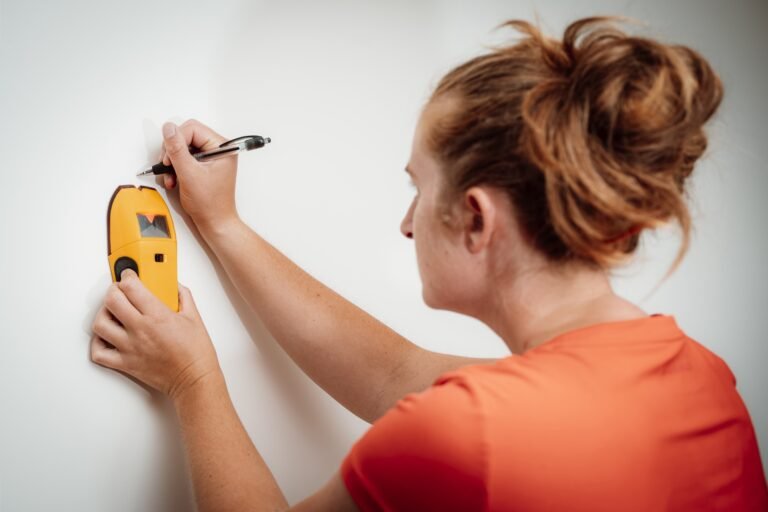
Place the tool flat against the wall.
If your finder requires calibration, activate it according to the manufacturer’s procedure.
Then move it slowly across the wall.
If it provides strong and repeatable stud indications, there is usually no reason to use Deep Scan.
If normal mode fails and the wall is known or suspected to be thick, switch to Deep Scan.
Activate Deep Scan
Some stud finders use a mode switch. Others use a button combination.
For example, certain Zircon models activate DeepScan through their mode controls or power-button sequence, depending on the particular model.
Do not assume the procedure from one model applies to another.
Calibrate Correctly
Some electronic stud finders require calibration before scanning.
Keep the tool flat and stationary while it calibrates if the instructions require this.
Starting over a stud can confuse some older or simpler scanners, while other models incorporate technology intended to recognize or correct that situation.
If your readings make no sense, move several inches and recalibrate.
Move Slowly Across the Wall
Do not sweep the finder quickly.
Keep it flat against the surface and move horizontally at a steady pace.
When it indicates an edge or center, mark the location lightly.
Scan From the Opposite Direction
Move past the suspected framing member and scan back toward it.
If you receive approximately the same indication from both directions, the result is more convincing.
For an edge-finding model, mark both edges and identify the midpoint.
For a center-finding model, compare the center indication from both directions.
Check Another Height
Move several inches higher or lower and repeat the scan.
A normal wall stud typically continues vertically, so you should generally see a consistent location at different heights unless blocking, openings, or other framing details interfere.
This extra verification takes only a few seconds and can prevent a misplaced hole.
Why Deep Scan May Give False or Confusing Readings
Deep scanning does not eliminate the limitations of electronic wall scanning.
In certain situations, it actually gives the scanner more hidden material to interpret.
You Are Detecting Another Dense Object
A wall cavity can contain much more than studs.
There may be plumbing, metal components, electrical boxes, conduit, blocking, fasteners, or structural hardware.
A deeper scan increases the region being evaluated, so another object may influence the result.
The Wall Has Multiple Materials
Imagine decorative wood paneling installed over drywall with adhesive.
The scanner sees changes associated with the paneling, adhesive, drywall, framing, and whatever is inside the cavity.
That is more complicated than scanning one smooth layer of drywall.
Take several readings instead of trusting the first signal.
You Started in the Wrong Location
Some stud finders can have difficulty if calibration begins directly over a stud.
If your tool reports an error or produces unusual readings, move to another location and restart according to its manual.
You Are Moving Too Quickly
Scanning too fast can cause inconsistent results.
Slow, controlled movement is normally better.
Your Hand Position Is Affecting the Sensor
Electronic wall scanners are designed to be held in a particular way.
Touching the wall with your other hand near the scanner, gripping the sensor area incorrectly, or lifting one edge of the unit can affect some tools.
Follow the manufacturer’s recommended grip.
The Battery Is Weak
A weak battery can cause erratic performance in some electronic measuring tools.
If the scanner suddenly becomes inconsistent and you have ruled out the wall, install the correct fresh battery and test again.
Does Deep Scan Detect Wires?
Deep Scan should not be treated as a dedicated wire detector.
Some stud finders include separate live-wire warning technology that remains active while using stud modes. Others provide a specific AC scanning mode.
These features vary by model.
For example, several Zircon stud finders combine StudScan and DeepScan with a separate WireWarning feature, while multifunction scanners may also include a dedicated AC Scan mode.
That distinction is important.
A stud indication does not mean the area is free of electrical wiring.
Likewise, the absence of an electrical warning is not proof that no wire exists.
Detection can be affected by wire depth, shielding, moisture, grounding conditions, wall materials, and whether the conductor is energized.
Before drilling, consider the likely paths of electrical and plumbing systems.
Be especially careful around outlets, switches, plumbing fixtures, and areas directly above or below them.
Does Deep Scan Detect Metal Studs?
That depends on the stud finder.
Many electronic stud finders are designed to detect both wood and metal framing in stud modes.
For example, several current Zircon DeepScan-capable models specify detection of both wood and metal studs.
However, finding a metal stud does not mean you should mount an object using the same hardware you would use for a wood stud.
Wood screws and lag bolts are intended to bite into wood.
Metal framing often requires different anchors, screws, or mounting methods depending on stud gauge, wall construction, and load.
The scanner helps locate the framing; it does not determine how much load the wall can safely support.
Deep Scan vs. Metal Scan
Deep Scan and Metal Scan should not be confused.
Deep Scan generally means looking deeper for framing using the stud-detection system.
Metal Scan is intended specifically to detect metal.
A multifunction scanner may use Metal Scan to locate objects such as steel or copper deeper behind a surface than its ordinary stud-scanning range.
On one current Zircon multifunction model, for example, StudScan and DeepScan are separate from Metal Scan, with Metal Scan having its own specified detection depths for ferrous and non-ferrous metals.
If your wall scanner offers both modes, choose the one that matches what you are actually trying to find.
For finding a normal wooden stud behind thick drywall, use Deep Scan.
For investigating a suspected metal pipe, metal stud, or other metal object, the dedicated metal mode may provide more useful information.
Deep Scan vs. AC Scan
The difference is even more important with electrical detection.
Deep Scan looks deeper for framing.
AC Scan is designed to locate certain energized electrical wiring.
The two functions answer different questions.
If your stud finder alerts to possible live electricity, do not simply ignore the warning because you also found a stud.
Electrical cables are commonly routed through or alongside framing.
If the intended mounting location may contain wiring, investigate before drilling.
Can Deep Scan Find Studs Through Plaster?
Sometimes, but plaster walls are challenging.
Traditional plaster-and-lath construction can contain wood lath, metal lath, multiple plaster layers, and many fasteners.
Those materials can make electronic readings extremely difficult to interpret.
The problem may not be scanning depth alone.
Switching to Deep Scan can help when thickness is the main issue, but it cannot necessarily overcome interference created by the construction system itself.
For plaster walls, a strong magnet can sometimes be useful for finding repeated fasteners associated with lath or framing, although interpreting those fasteners also requires care.
Higher-end wall scanners may perform better than basic stud finders in difficult construction.
Can Deep Scan Work Through Tile?
Do not assume it will.
Tile installations may include tile, mortar or adhesive, cement board, drywall, membranes, metal reinforcement, or other materials.
Some electronic scanners can work through certain tile assemblies, while others may struggle badly.
Deep Scan may provide extra depth but does not make an incompatible surface suddenly scannable.
If you need to mount something through tile, especially in a bathroom or shower area, locating framing before the tile is installed is ideal.
If the wall is already finished, use a scanner specifically rated for the materials involved or another appropriate locating method.
Also consider plumbing and waterproofing behind bathroom walls before drilling.
Should You Use Deep Scan for Mounting a TV?
Use Deep Scan if the wall construction requires it.
If a normal stud scan gives repeatable stud locations through ordinary drywall, stay with normal mode.
If the television wall has double drywall, paneling over drywall, or another compatible thick finish and normal scan cannot find framing reliably, Deep Scan becomes useful.
For a heavy TV, do not rely solely on one scanner pass.
Locate the framing, repeat the scan from the opposite direction, and verify the location at another height.
A strong magnet can provide additional confirmation by locating screws used to fasten drywall to framing.
Once the stud is confirmed, use mounting hardware appropriate for the actual framing and follow the TV mount manufacturer’s installation requirements.
How to Confirm a Deep Scan Reading
A deep reading deserves confirmation because the scanner is evaluating more material below the surface.
First, scan from both directions.
Next, repeat the scan several inches higher or lower.
If the target appears in approximately the same horizontal location each time, a vertical stud is a reasonable possibility.
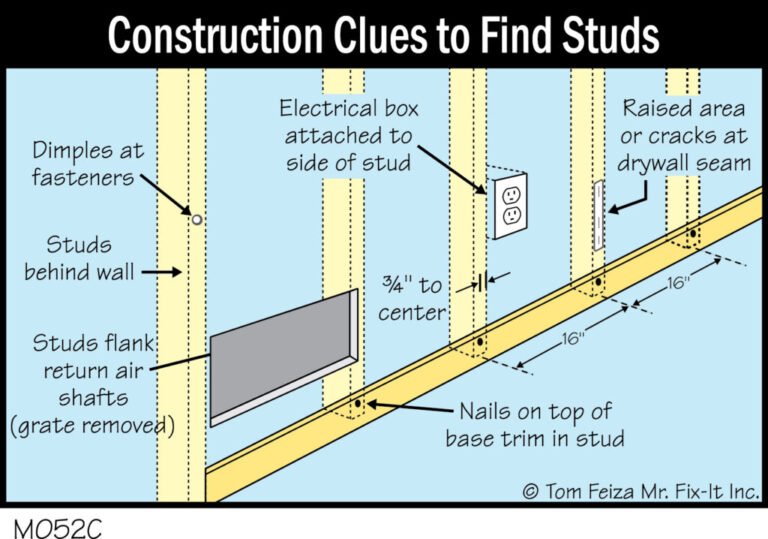
Then look at expected framing patterns.
Studs in residential walls commonly follow regular layouts, although spacing can change around doors, windows, corners, plumbing, cabinets, and structural details.
You can also use a strong magnet to search for drywall fasteners.
Several magnetic hits aligned vertically close to your electronic stud reading provide useful supporting evidence.
For high-load mounting, I prefer this two-method approach over trusting one beep from a scanner.
Key Takeaways:
- Confirm Deep Scan results by scanning from both directions and at more than one height.
- For heavy mounting, use another locating method such as a magnet before drilling whenever the wall construction is uncertain.
Common Mistakes When Using Deep Scan
The most common mistake is turning on Deep Scan before determining whether it is needed.
Start with the normal mode.
Another mistake is believing that a deeper alert automatically represents a stud.
Deep Scan increases detection depth, not certainty.
Users also sometimes ignore the difference between stud, metal, and AC modes. These modes may use different sensing behavior and are intended for different targets.
A fourth mistake is assuming the scanner guarantees that drilling is safe.
It does not.
A stud itself may contain holes carrying electrical cables or plumbing, and metal protection plates may be installed specifically to prevent screws from reaching those utilities.
If your drill encounters unexpected metal, stop rather than forcing through it.
Safety Before Drilling After a Deep Scan
Finding a stud is only half of the job.
You also need to make sure the area is appropriate for penetration.
Do not assume there are no electrical wires simply because the stud finder did not show an electrical warning. Manufacturer instructions for wall scanners commonly warn users not to rely on the absence of a warning as proof that no live conductor is present.
Consider what is on both sides of the wall.
Pay particular attention to nearby electrical outlets, switches, plumbing fixtures, sinks, showers, and appliances.
Use the appropriate fastener length.
An unnecessarily long screw can pass through the stud farther than required and increase the chance of reaching something concealed behind it.
If you hit an unexpected metal plate, do not drill through it simply to reach the stud. It may be protecting wiring or plumbing.
For heavy or safety-critical installations where you cannot confidently determine what is inside the wall, professional assessment is the safer option.
FAQs about What Is Deep Scan on Stud Finder
What does Deep Scan mean on a stud finder?
Deep Scan is a mode that increases the depth at which a compatible stud finder searches for framing. It is intended primarily for thicker wall surfaces where normal stud mode cannot reliably locate the framing.
How deep does Deep Scan go?
It depends on the model. Several common Zircon stud finders are rated for approximately 3/4 inch in standard mode and 1 1/2 inches in DeepScan, but other stud finders may have different limits.
Is Deep Scan more accurate?
Not necessarily.
Deep Scan is designed to scan farther, not automatically more precisely. On an ordinary thin wall, normal stud mode can actually be easier to interpret.
Should I always use Deep Scan?
No.
I recommend beginning with standard stud mode. Switch to Deep Scan when wall thickness prevents you from obtaining a reliable normal-mode reading.
When should I use Deep Scan?
Use it when scanning through compatible thicker materials such as double drywall, drywall covered by paneling, or another wall assembly where framing is deeper below the visible surface.
Can Deep Scan detect electrical wires?
Deep Scan itself should not be considered a dedicated electrical-wire mode. Some scanners provide live-wire warnings or a separate AC detection function.
Always follow the capabilities and limitations stated for your exact scanner.
Can Deep Scan find pipes?
It may respond to changes caused by certain objects depending on the technology, but a stud-finding Deep Scan mode is not automatically a pipe detector.
Use an appropriate metal or utility-detection mode if your scanner provides one.
Can Deep Scan detect metal studs?
Many stud finders can identify both wood and metal framing in their stud modes, but this is model-dependent. Check your tool’s specifications.
Can Deep Scan work through two layers of drywall?
It can on stud finders whose rated scanning depth is sufficient for the total wall thickness. Deep Scan is specifically useful in situations where an additional drywall layer places framing beyond the normal scanning range.
Why does Deep Scan detect everything?
If Deep Scan seems to produce many alerts, it may be sensing additional material deeper inside the wall or reacting to complicated wall construction.
Return to normal mode if the wall is not unusually thick, recalibrate as required, and confirm results from both directions.
Why does normal Stud Scan work but Deep Scan gives a different location?
The deeper mode may be responding to an additional object or material farther inside the wall.
If standard mode gives strong, repeatable results on an ordinary drywall wall, I would normally use that result rather than switching unnecessarily to Deep Scan.
Do I need Deep Scan for a TV mount?
Only if the wall is too thick for normal mode.
For ordinary drywall, standard stud mode may be all you need. For paneling over drywall or multiple drywall layers, Deep Scan can be helpful.
Does Deep Scan work on ceilings?
A stud finder designed for locating joists may use Deep Scan on compatible ceiling surfaces when additional material puts the joist beyond normal scanning depth.
Check your model’s instructions because ceiling construction can be more complex than a basic drywall wall.
What is the difference between Stud Scan and Deep Scan?
Stud Scan is the normal-depth framing mode.
Deep Scan extends the search farther beneath the surface for framing hidden by thicker wall material.
What should I do if Deep Scan still cannot find a stud?
Confirm that the wall material is compatible with your scanner, install a fresh battery if needed, check your calibration technique, and scan slowly from both directions.
If electronic detection remains unreliable, use another appropriate method such as a strong magnet or a more capable wall scanner.
Conclusion
What is deep scan on stud finder? Deep Scan is a deeper stud-detection setting intended to locate framing when extra wall thickness puts the stud beyond the reliable range of normal stud mode. It is especially useful for compatible surfaces such as double drywall, paneling over drywall, and certain remodeled walls.
The important point is that deeper does not automatically mean better.
For a normal single-layer drywall wall, I recommend starting with standard Stud Scan. If it produces clear, repeatable readings, there is no reason to switch modes. If the wall is thicker and normal mode cannot reliably locate the framing, Deep Scan is the appropriate next step.
Always check the specifications for your exact stud finder because scan depth varies by model. Some popular models approximately double their scanning range from around 3/4 inch to 1 1/2 inches when Deep Scan is selected, but that should not be treated as a universal specification for every device.
Most importantly, do not treat a Deep Scan indication as proof that drilling is automatically safe. Confirm important stud locations from both directions, use a second method when mounting heavy objects, and remain aware that electrical wiring, plumbing, metal components, and other hidden materials may share the wall cavity.